How I Built an AI Document Assistant for a Client
private ai
ai document assistant
llm for business
business automation
rag systems
pgvector
knowledge base
vector databases
10 min read
17 views
The day my client's team stopped guessing
A client of mine runs a property management company with about forty staff, and they came to me with a problem that sounds small but was quietly draining money every single day. Their team kept answering the same questions over and over, and the answers were buried inside hundreds of documents. Lease rules, maintenance policies, vendor contracts, and onboarding guides were spread across folders that nobody could search properly. I fixed it by building them an AI document assistant, a private tool that reads their own files and answers questions in plain language within seconds. This article is the full, honest story of that build, including the approaches that failed, the exact steps and code that worked, and the results the business actually felt.
I am writing it so two kinds of readers get value. If you own or run a business, you will see how a tool like this saves real hours and money. If you write code, you will get a clear, step by step path you can follow and adapt to your own stack.
The real problem: the answers existed, but nobody could find them
When I sat with their team, the pattern was easy to spot. A tenant would ask whether they could sublet their flat. A new staff member would ask how to handle an emergency repair at night. An owner would ask why a particular fee appeared on their statement. The correct answer almost always lived somewhere in a document. The trouble was finding it quickly. Staff would open several files, scroll through long PDFs, ask a senior colleague, and sometimes still guess.
Multiply that by dozens of questions a day and the cost becomes clear. Replies were slow, which made customers unhappy. New hires took weeks to become useful, because the real knowledge lived in people's heads or in files they did not know existed. And senior staff were pulled away from important work to answer the same basic questions again and again. The knowledge was all there. It was simply locked away.
Why the obvious fixes did not work
My client had already tried a few common fixes before calling me, and most businesses reach for the same ones.
Keyword search did not understand meaning
Their intranet search matched exact words. So when someone typed "can a tenant rent out their flat" but the policy document said "subletting," the search returned nothing useful. Keyword search looks for matching letters, not matching meaning, so it misses the moment people phrase things in their own words.
Pasting documents into a public chatbot
When AI tools became popular, someone tried copying whole documents into a public chatbot and asking questions. This failed for three reasons. The documents were far too long to fit. The answers often sounded confident but were wrong. And, most seriously for a business handling private records, their information was leaving the company with no control over where it went.
Fine tuning a model on the documents
A developer friend suggested training, or fine tuning, a model on all of their documents. It sounds clever, but in practice it is expensive, it has to be redone every time a policy changes, and it still invents exact details like dates and fees. For a knowledge base that updates often, it is the wrong tool.
None of these gave the business what it actually needed, which was a trustworthy answer, grounded in the company's own files, delivered fast, and kept completely private.
What the investigation really revealed
Once I dug in, I landed on the lesson I keep relearning. The model is not the hard part. The hard part is retrieval, which simply means finding the right few paragraphs before the AI writes anything.
A language model can produce an excellent answer, but only when you hand it the correct source text. Give it everything at once and it drowns in noise and guesses. Give it nothing and it makes things up. The whole craft is to fetch only the handful of relevant paragraphs for each question, then let the model answer strictly from those, while clearly citing where each answer came from. This pattern has a name, retrieval augmented generation, usually shortened to RAG, and it is the practical and safe way most businesses should add AI to their own knowledge.
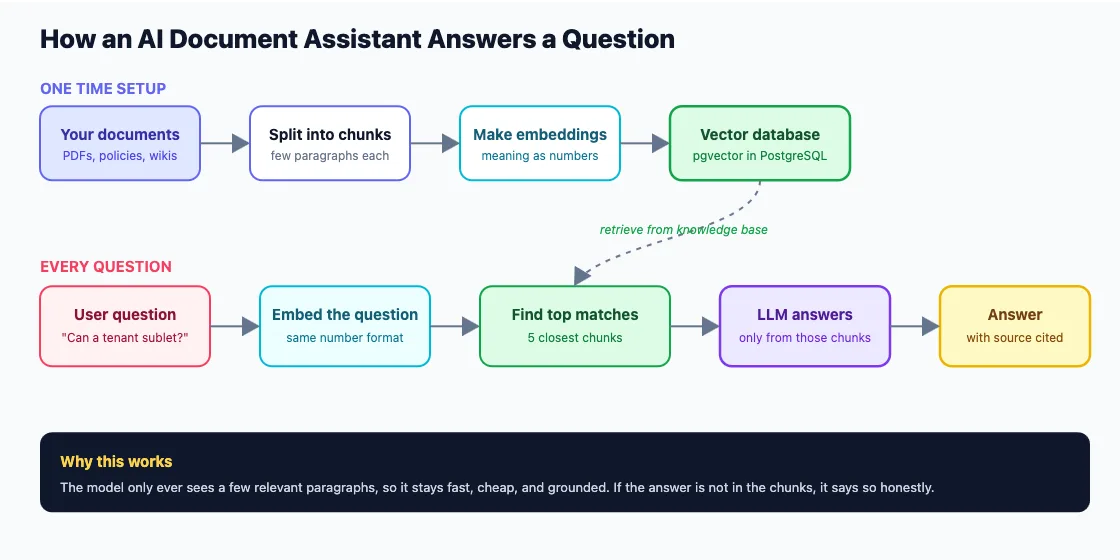
It helps to see the wrong way first, because it is the tempting shortcut almost everyone tries.
// The tempting shortcut: paste every document into the prompt
async function answerQuestion(question, allDocuments) {
const everything = allDocuments.join("\n\n"); // hundreds of pages
const reply = await llm.chat({
messages: [{ role: "user", content: `${everything}\n\nQuestion: ${question}` }]
});
return reply.text; // too long to fit, slow, costly, and it guesses
}
This breaks down immediately in the real world. The combined text is too long, so the request gets cut off or rejected. Every call is slow and costly, because you push every page each time. And buried in all that noise, the model loses focus and starts to guess. The fix is to send only what matters, which is exactly what the next steps do.
Building the AI document assistant step by step
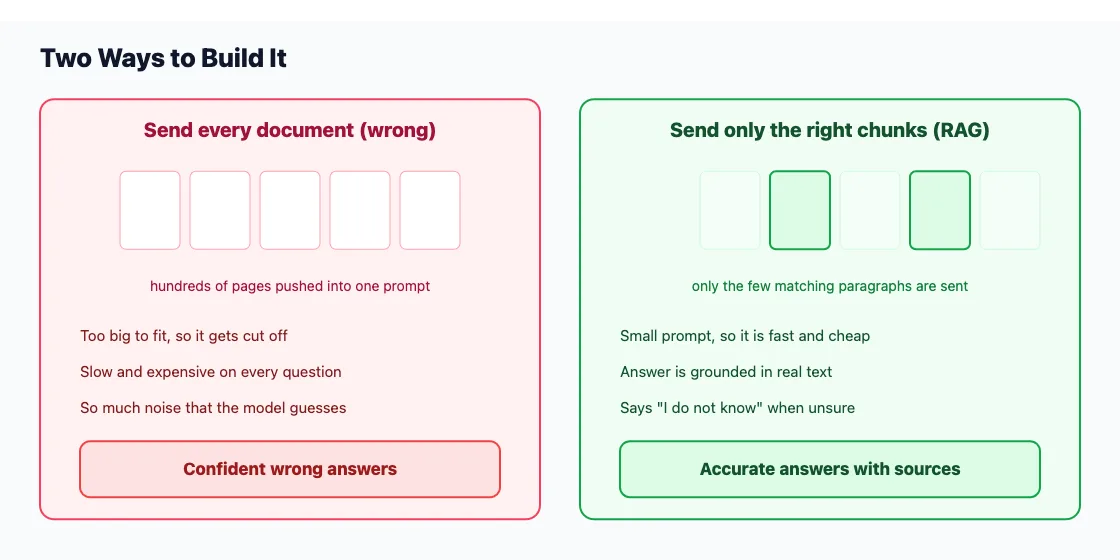
Here is the actual path I followed. I have kept each step small so you can follow along and adapt it to your own stack, whether you run Node, PHP, or something else.
Step 1: Set up a vector store with pgvector
First we need somewhere to store the meaning of each chunk and search it fast. For this client I used pgvector, an extension that adds vector search directly to PostgreSQL. That choice mattered, because it meant their data stayed inside the database they already owned and trusted, rather than going to a third party.
-- Turn on the vector extension (one time)
CREATE EXTENSION IF NOT EXISTS vector;
-- A table to hold each chunk, its source, and its embedding
CREATE TABLE document_chunks (
id BIGSERIAL PRIMARY KEY,
source TEXT NOT NULL, -- e.g. "lease_policy.pdf"
doc_type TEXT, -- e.g. "lease", "maintenance"
content TEXT NOT NULL, -- the chunk text
embedding VECTOR(1536) -- the meaning, stored as numbers
);
-- An index so similarity search stays fast as data grows
CREATE INDEX ON document_chunks
USING ivfflat (embedding vector_cosine_ops) WITH (lists = 100);
The index keeps similarity search quick as the number of chunks grows into the thousands.
Step 2: Split documents into clean chunks
We do not store whole documents. We store small, overlapping pieces, because we want to retrieve precise paragraphs rather than entire files. The small overlap means a sentence that sits on the boundary between two chunks still appears in full somewhere.
// Split a long document into overlapping chunks of a few paragraphs
function chunkText(text, chunkSize = 800, overlap = 150) {
const words = text.split(/\s+/);
const chunks = [];
for (let i = 0; i < words.length; i += (chunkSize - overlap)) {
const chunk = words.slice(i, i + chunkSize).join(" ");
if (chunk.trim()) chunks.push(chunk);
}
return chunks; // small, overlapping pieces retrieve more accurately
}
Step 3: Create embeddings and save them
Next we turn each chunk into an embedding, which is just a list of numbers that captures the meaning of the text. Two chunks about subletting end up close together even if they use different words. We create an embedding for every chunk and store it next to the original text.
import { pool } from "./db.js"; // your PostgreSQL connection
// Create an embedding for a piece of text
async function embed(text) {
const res = await embeddings.create({
model: "text-embedding-3-small",
input: text
});
return res.data[0].embedding; // an array of 1536 numbers
}
// Read a document, split it, embed each chunk, and save it
async function ingestDocument(source, docType, fullText) {
const chunks = chunkText(fullText);
for (const content of chunks) {
const vector = await embed(content);
await pool.query(
`INSERT INTO document_chunks (source, doc_type, content, embedding)
VALUES ($1, $2, $3, $4)`,
[source, docType, content, JSON.stringify(vector)]
);
}
}
You run this ingestion step whenever you add or update documents. That is the entire knowledge base, built once and easy to extend.
Step 4: Find the most relevant chunks for a question
Now the live part. When a question arrives, we embed the question the same way, then ask pgvector for the chunks whose meaning sits closest to it.
// Find the chunks whose meaning is closest to the question
async function findRelevantChunks(question, limit = 5) {
const questionVector = await embed(question);
const { rows } = await pool.query(
`SELECT source, content
FROM document_chunks
ORDER BY embedding <=> $1 -- <=> measures distance between vectors
LIMIT $2`,
[JSON.stringify(questionVector), limit]
);
return rows; // the few paragraphs most likely to hold the answer
}
The <=> operator measures how close two vectors are, so the database does the hard search work for us and hands back only the most relevant paragraphs.
Step 5: Write a grounded answer with the language model
Finally we give those few chunks to the model with a strict instruction. Answer using only this text, cite the source, and if the answer is not present, say so honestly instead of guessing. That honesty rule is the single most important line in the whole system.
// Build a grounded prompt and ask the model to answer from it only
async function answerQuestion(question) {
const chunks = await findRelevantChunks(question);
const context = chunks
.map(c => `[Source: ${c.source}]\n${c.content}`)
.join("\n\n");
const reply = await llm.chat({
messages: [
{
role: "system",
content:
"Answer using only the context below. Always cite the source. " +
"If the answer is not in the context, reply that you do not know."
},
{ role: "user", content: `Context:\n${context}\n\nQuestion: ${question}` }
]
});
return { answer: reply.text, sources: chunks.map(c => c.source) };
}
Step 6: Put it behind a simple API
To make it usable, we wrap everything in one small endpoint that a React front end can call. The team gets a clean chat box, and the heavy lifting stays on the server.
import express from "express";
const app = express();
app.use(express.json());
// One endpoint your React front end can call
app.post("/api/ask", async (req, res) => {
const { question } = req.body;
if (!question) {
return res.status(400).json({ error: "Please include a question." });
}
const result = await answerQuestion(question);
res.json(result); // returns { answer, sources }
});
app.listen(3000, () => console.log("Assistant API ready on port 3000"));
That is the full loop, from a raw document to a grounded answer with its source, in a few hundred lines.
The details that made it reliable
The skeleton above works, but a few extra touches turned it from a neat demo into a tool people relied on every day.
Smarter chunking and metadata
We tagged every chunk with its document type, such as lease or maintenance, and let the search filter on that when needed. A question clearly about repairs would only pull from maintenance documents, which made answers sharper and faster.
Keeping the answers honest
We tested the assistant with a long list of real questions the team had asked in the past, and checked that it cited the right source each time. When it was unsure, we wanted it to say so, and that behaviour built more trust than any clever wording could.
Updating knowledge without retraining
Because the knowledge lives in the vector database, updates are simple. When a policy changes, we add the new document, run the ingestion step, and the assistant knows it at once. There is no slow or costly retraining, which is a big advantage over fine tuning.
The engineering impact
Once retrieval was solid, the results were steady. Answers came back in a couple of seconds, each showing the exact document and section it came from, so staff could click through and confirm. Updating the knowledge was a one line job. And because everything ran inside the client's own database and servers, the private data stayed private. The honest "I do not know" behaviour meant the assistant almost never produced a confident wrong answer, which is the failure that breaks trust the fastest.
The business impact
The numbers that mattered to the owner were simple. Time spent hunting for answers dropped sharply, which freed senior staff from constant interruptions. New hires became productive in days rather than weeks, because they could ask the assistant instead of bothering a colleague. Customer replies got noticeably faster, and the clients mentioned it without being asked.
For a business owner, this is the real promise of modern AI. It is not about chasing hype. It is about taking knowledge you already own and making it instantly useful, so your team spends time on work that grows the business rather than digging through files. The lesson I share with every client is the same. Start with a real and expensive problem, ground every answer in your own trusted documents, and keep your data private. Do that, and an AI document assistant stops being a gimmick and becomes one of the most useful tools your team has.
Suggested Articles
If you’re evaluating AI solutions for your business or product, AI Agents vs AI Workflows Architecture Step by Step Guide will help you understand when to use autonomous AI agents and when a structured workflow is the smarter choice.
Looking to move beyond AI demos and build something that works in production? Building Production-Ready AI Workflows with n8n, OpenAI, and Vector Databases walks through the architecture, tools, and best practices needed to deploy reliable AI systems at scale.
If you’re building modern web applications, Why Most Next.js Apps Become Slow Over Time explains the hidden architectural decisions that gradually impact performance and what you can do to avoid them from the start.
Read about How I Shipped Production-Ready AI Agents for a Client
External Links
Frequently Asked Questions
Let's build
Have a project worth building?
If this maps to a problem in your business, tell me about it. I will tell you honestly whether software or AI can fix it, and how I would build it.
Continue Reading
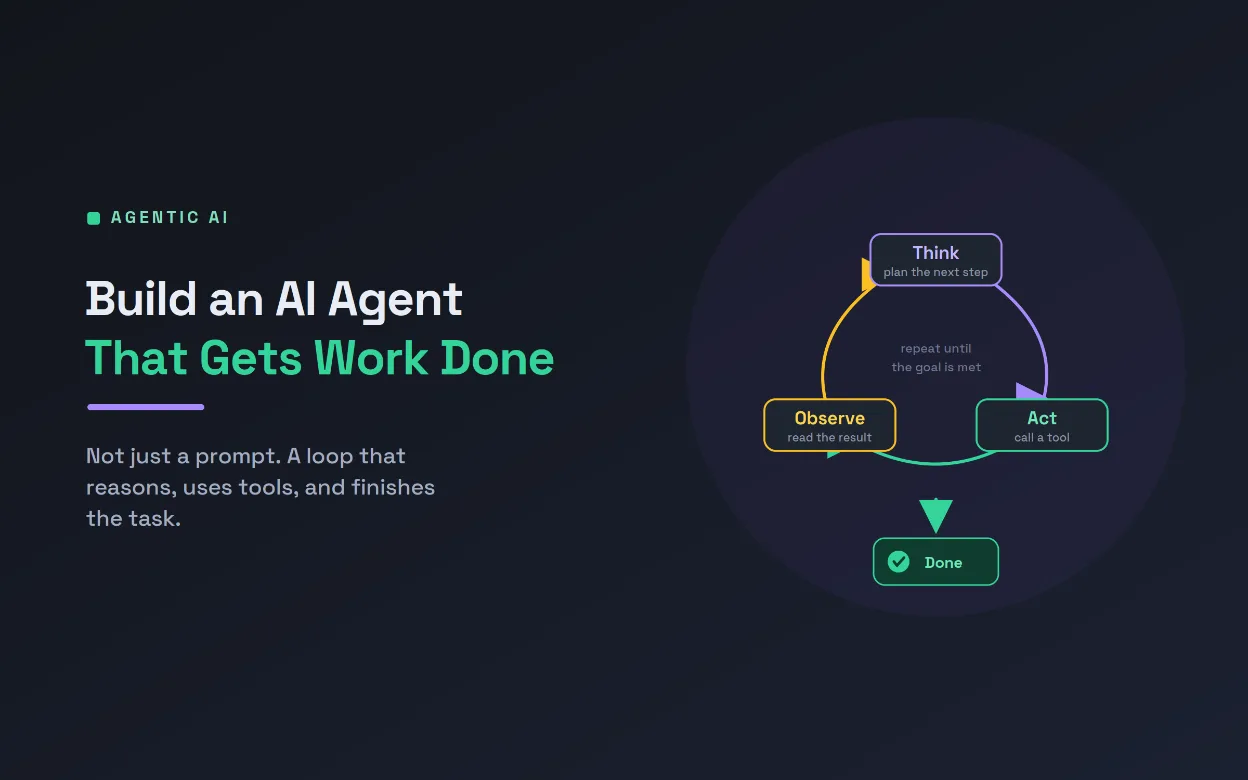
AI Development13 min read
Build an AI Agent to Automate a Real Task
An AI agent is not a chatbot, it is an LLM in a loop that reasons, calls tools, and works until a task is done. This technical guide builds a real inbox-triage agent step by step, with tool schemas, the agent loop, permissions, and production guardrails.
Aug 05, 20264 views
AI Development10 min read
Screen Job Applications Faster With AI Shortlisting
A single open role can draw hundreds of applications. This guide shows how AI resume screening ranks candidates on job-relevant criteria, with the fairness safeguards and human oversight that responsible hiring demands, so your team spends its time on the strongest few.
Jul 18, 20267 views
AI Development9 min read
Predict Customer Churn and Win Them Back With AI
Most customers leave quietly, without a complaint. This guide shows how AI predicts customer churn from the small signals that come before someone cancels, then drafts a personal win-back message, so your team can act while there is still time.
Jul 13, 20262 views