Why Most Next.js Apps Become Slow Over Time
react server components
javascript performance
performance optimization
web performance
frontend architecture
next.js
data fetching
next.js app router
8 min read
90 views
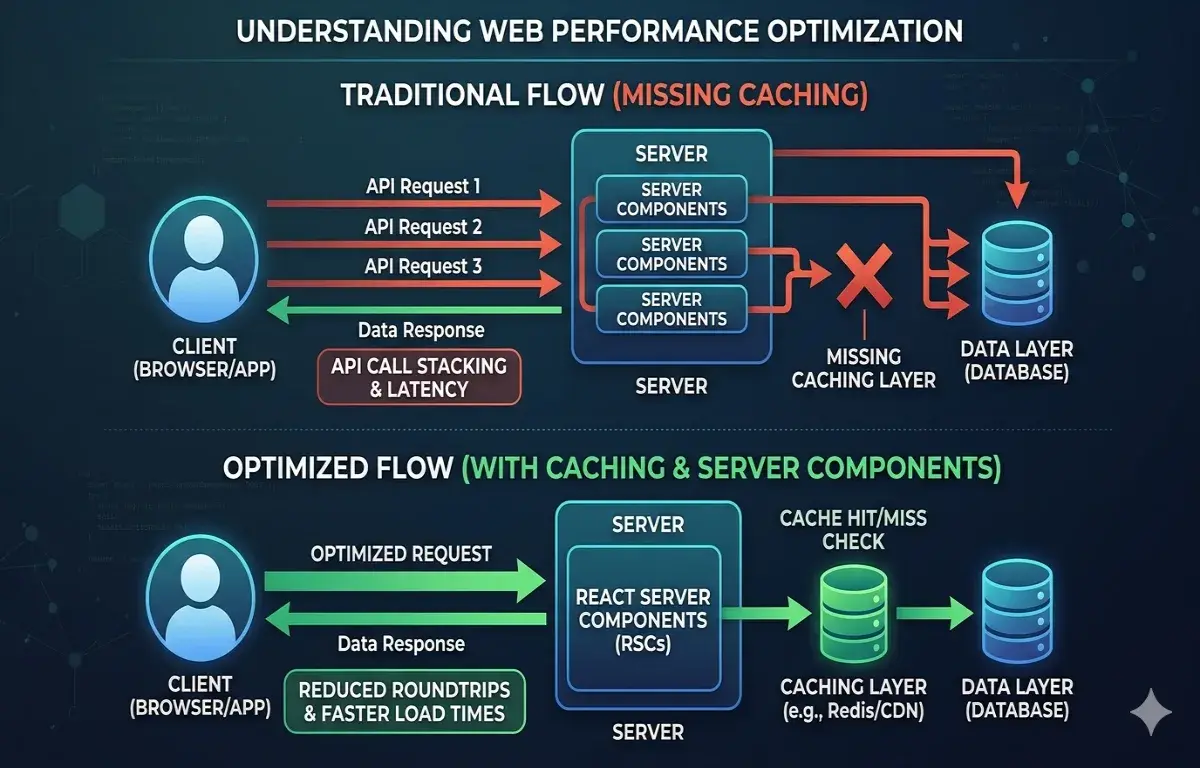
Next.js apps becoming slow over time is a common performance issue caused by inefficient data fetching and server components misuse. What starts as a fast, optimized setup gradually degrades as rendering complexity increases. Without proper Next.js performance optimization, these patterns lead to slower responses, increased latency, and poor scalability in production environments.
Why Your Next.js App Was Fast at First, And Isn’t Anymore
Every Next.js project starts the same way.
Initial pages load quickly.
Server Components feel efficient.
Everything looks clean and modern.
Then a few weeks later, something changes.
Pages start taking longer to load.
APIs feel slower.
The UI becomes slightly laggy — not broken, but noticeably worse.
This is one of the most common problems teams face when working with Next.js App Router.
And the root cause is almost always the same:
Data fetching and server component misuse.
If you’re serious about Next.js performance optimization, you need to understand what actually happens inside the rendering pipeline.
The Hidden Problem with Server Components
Server Components are powerful, but they introduce a subtle risk.
They make data fetching feel “free”.
You can write:
const data = await fetch("/api/data");directly inside a component.
It feels clean. But under the hood, each call introduces:
Network latency
Serialization overhead
Potential duplication
When multiple components fetch data independently, you get something like this:
Component A → fetch data
Component B → fetch data
Component C → fetch dataEach component creates its own request.
This leads to:
Duplicated queries
Slower page rendering
Unnecessary backend load
The Real Issue: Waterfall Data Fetching
The biggest performance killer in Next.js apps is waterfall fetching.
Example:
const user = await getUser();
const posts = await getPosts(user.id);
const comments = await getComments(posts[0].id);This looks logical, but execution becomes sequential.
Each step waits for the previous one.
This dramatically increases response time.
A Common Wrong Implementation
Here’s a typical pattern seen in production apps:
export default async function Page() {
const user = await fetchUser();
const projects = await fetchProjects(user.id);
const analytics = await fetchAnalytics(user.id);
return <Dashboard user={user} projects={projects} analytics={analytics} />;
}Problems:
Sequential API calls
No caching
Repeated backend queries
Slow TTFB (Time to First Byte)
This is why apps degrade over time.
The Production-Ready Data Fetching Pattern
Instead of sequential fetching, you should parallelize requests.
export default async function Page() {
const [user, projects, analytics] = await Promise.all([
fetchUser(),
fetchProjects(),
fetchAnalytics()
]);
return <Dashboard user={user} projects={projects} analytics={analytics} />;
}This simple change:
Reduces latency significantly
Improves TTFB
Scales better under load
Caching: The Most Misunderstood Part of Next.js
Next.js provides built-in caching, but most developers misuse it.
By default, fetch() may behave differently depending on:
Server vs client
Cache settings
Revalidation options
Correct usage:
await fetch("/api/data", {
cache: "force-cache"
});Or for dynamic data:
await fetch("/api/data", {
next: { revalidate: 60 }
});Without proper caching:
APIs get hammered
Performance degrades
Costs increase
The Real Fix: Centralized Data Layer
One of the biggest improvements you can make is introducing a data orchestration layer.
Instead of fetching data inside multiple components:
Component → fetch
Component → fetch
Component → fetchUse:
Page → fetch all data
↓
Pass to componentsOr even better:
Create a service layer
Centralize queries
Reuse results
This reduces duplication and improves maintainability.
Server vs Client Components, Where Most Teams Go Wrong
Another major issue is mixing server and client components incorrectly.
Mistakes include:
Moving too much logic to client
Unnecessary hydration
Excessive state management
Golden rule:
Server Components → data fetching
Client Components → interaction only
Breaking this rule introduces:
Larger bundle sizes
Slower hydration
Worse performance
The Missing Piece: Observability
Most teams don’t measure performance properly.
You should track:
TTFB (Time to First Byte)
API response times
Number of fetch calls per page
Cache hit rates
Without this, performance issues remain hidden until users complain.
What Actually Fixes Next.js Performance Long-Term
From real production systems, these are the changes that consistently work:
Parallel data fetching
Proper caching strategy
Centralized data layer
Minimizing client components
Reducing duplicate API calls
These are not “optimizations”.
They are architecture decisions.
The Business Impact Most Teams Ignore
Performance isn’t just a technical issue.
It directly affects:
SEO rankings
User retention
Conversion rates
A slow Next.js app doesn’t just frustrate developers.
It costs money.
Code Summary (Key Patterns)
❌ Wrong (Sequential + No Cache)
const user = await fetchUser();
const projects = await fetchProjects(user.id);✅ Correct (Parallel + Optimized)
const [user, projects] = await Promise.all([
fetchUser(),
fetchProjects()
]);Suggested Links
If you’re exploring performance issues, you should also know AI Agents vs AI Workflows Architecture Step by Step Guide.
Another useful area is learning how database query design and indexing mistakes silently degrade performance in production systems.
External Links
Frequently Asked Questions
Let's build
Have a project worth building?
If this maps to a problem in your business, tell me about it. I will tell you honestly whether software or AI can fix it, and how I would build it.