A Single Missing Database Index Took Our App from 120ms to 4.8s. Here’s How I Found It
backend scalability
sql
database optimization
query optimization
database indexing
production debugging
missing database index
12 min read
9 views

This database performance issue didn’t look like a typical failure. There were no crashes, no alerts, and no obvious slow query warnings. Locally, everything felt fast, masking the missing database index that only impacted production. As traffic increased, query performance degraded, leading to rising latency and unpredictable response times. This is exactly how hidden indexing issues silently turn into major production bottlenecks.
This also leads you to confusion "Why Your API Is Fast in Development but Painfully Slow in Production"
Why Performance Bugs Like This Slip Through
The root problem was not complexity. It was scale.
In development, the database had a few thousand rows. In production, it had millions. Queries that were “fast enough” locally were silently degrading under real data volume.
The application code had not changed. Traffic had grown. Data had grown. The architecture had not adapted.
That mismatch always ends badly.
The Query That Looked Innocent
The problematic endpoint fetched a paginated list with filters. Nothing fancy.
Here’s the simplified version of the query:
SELECT *
FROM orders
WHERE company_id = ?
ORDER BY created_at DESC
LIMIT 20 OFFSET 0;On paper, this looks reasonable. In reality, it was doing far more work than expected.
Bug Breakdown – What the Database Was Actually Doing
The problem was not the query logic. It was how the database executed it. There was no index on company_id combined with created_at.
So for every request, the database:
Scanned a large portion of the table
Sorted rows in memory
Then returned only 20 results
With low data volume, this was invisible. With millions of rows, it became catastrophic.
The Moment the Problem Became Obvious
The turning point was running EXPLAIN ANALYZE.
EXPLAIN ANALYZE
SELECT *
FROM orders
WHERE company_id = 42
ORDER BY created_at DESC
LIMIT 20;The output showed:
Sequential scan
High cost
Large number of rows examined
The database was working hard to return almost nothing. That’s when it clicked. This wasn’t an application bug. It was a data access bug.
The Fix Was a Single Index (But Not a Random One)
Adding an index blindly is how systems rot over time. The index had to match the access pattern.
Correct Index
CREATE INDEX idx_orders_company_created
ON orders (company_id, created_at DESC);This allowed the database to:
Filter by company immediately
Read rows in the correct order
Stop as soon as it had enough results
The difference was immediate.
Before vs After
Before:
Average response time: ~4.8 seconds
CPU spikes during peak hours
Inconsistent performance
After:
Average response time: ~120ms
Stable CPU usage
Predictable latency under load
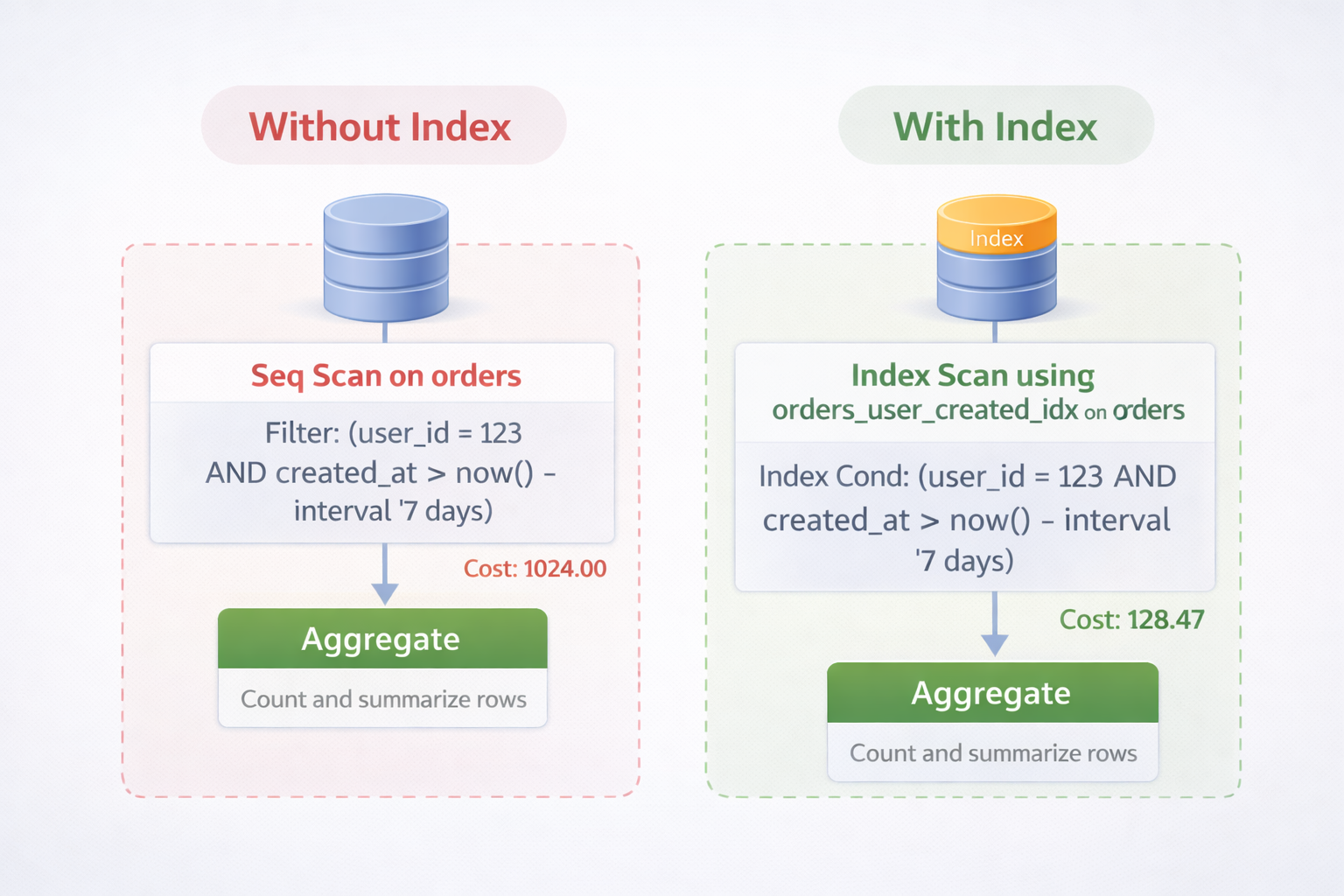
No code changes. No caching layers. No infrastructure upgrades. Just one index.
What I Changed in the Process After This
This bug changed how I approach backend performance.
I stopped trusting:
“It’s fast locally”
ORM abstractions
Small datasets
I started enforcing:
Query plans reviewed for critical endpoints
Indexes designed with access patterns
Performance testing with production-like data
This one issue saved weeks of future debugging.
Why Indexes Are Not “Free”
Indexes improve reads but affect writes.
Every insert now had a small additional cost. That was acceptable because:
Reads outnumbered writes heavily
User-facing performance mattered more
Write latency stayed within limits
Performance decisions are always tradeoffs. The key is making them consciously.
Why This Was a Business Problem, Not Just a Technical One
Slow list pages caused:
Higher bounce rates
Abandoned workflows
Support complaints
Reduced trust in the platform
After the fix, usage stabilized without marketing changes. Performance quietly influences revenue more than most teams realize.
The Pattern This Bug Fits Into
This issue wasn’t unique. It belongs to a larger class of problems:
Queries that scale linearly with data
Missing compound indexes
Sorting without constraints
Pagination without access-path awareness
Once you recognize the pattern, you start seeing it everywhere.
Final Takeaway
Performance problems don’t always come from complex code. They often come from simple assumptions that no longer hold at scale.
If your app is growing, your database access patterns must evolve with it. Otherwise, one missing index will eventually take the blame for everything.
More Example
Anti-Pattern
ORDER BY created_at DESC(without supporting index)
Correct Pattern
INDEX (company_id, created_at DESC)Databases are fast when you let them stop early. Indexes are how you give them permission to do that.
Suggested Links
If you’re facing unexplained slowdowns like this, it’s worth stepping back and looking at patterns beyond just one query. As your system grows, Why Most “Scalable” Architectures Collapse After the First 10K Users explains why early design decisions start failing under real load. And if your issue goes deeper into database access patterns, How a Hidden N+1 Query Slowed API by 6x and the Exact Steps I Used to Fix It breaks down another silent performance killer that often gets missed until it’s too late.
Frequently Asked Questions
Let's build
Have a project worth building?
If this maps to a problem in your business, tell me about it. I will tell you honestly whether software or AI can fix it, and how I would build it.