How a Hidden N+1 Query Slowed API by 6x and the Exact Steps I Used to Fix It
17 min read
140 views

This wasn’t a dramatic outage. No alerts fired. CPU usage looked fine. Memory was stable. Yet users started complaining that list pages felt sluggish, especially during peak hours. Nothing looked broken. But production response times quietly became six times slower due to the slowed API.
That’s the most dangerous category of performance bug. When nothing is obviously broken, teams debate opinions instead of evidence.
From experience, I knew this pattern usually points to one place: the database doing far more work than the code makes obvious.
Why This Never Showed Up in Development
In development, the database had a few hundred rows. In production, it had millions.
The endpoint returned a list of orders along with customer details. Locally, the response was instant. In production, latency grew linearly with traffic.
This is exactly how N+1 queries hide. They don’t explode. They scale quietly until they dominate response time.
The Laravel Code That Looked Completely Fine
This was the controller code running in production. It passed reviews. It looked clean. It was idiomatic Laravel.
use App\Models\Order;
public function index()
{
$orders = Order::latest()
->limit(50)
->get();
return $orders->map(function ($order) {
return [
'id' => $order->id,
'total' => $order->total_amount,
'customer_name' => $order->customer->name,
];
});
}Nothing here looks suspicious. And that’s exactly why this bug survived.
Where the Hidden N+1 Query Actually Lived
The issue wasn’t the query fetching orders.
It was this line:
$order->customer->nameLaravel relationships are lazy-loaded by default. That means every time customer was accessed, Laravel executed a new query.
What actually happened per request:
One query to fetch 50 orders
Fifty additional queries to fetch customers
Total: 51 queries per request
Under concurrent traffic, this crushed the database.
Proving the N+1 Instead of Guessing
Before touching the code, I needed proof.
Laravel makes this easy. I temporarily listened to queries for this endpoint only.
use Illuminate\Support\Facades\DB;
DB::listen(function ($query) {
logger()->info($query->sql);
});One request produced dozens of identical queries:
select * from customers where customers.id = ? limit 1;Repeated again and again. At that point, the debate ended. Evidence replaced opinion.
The Actual Fix – Make Data Access Explicit
This wasn’t a caching problem.
It wasn’t a pagination problem.
It was an intent problem.
Laravel wasn’t told what data the endpoint needed. So it guessed, repeatedly.
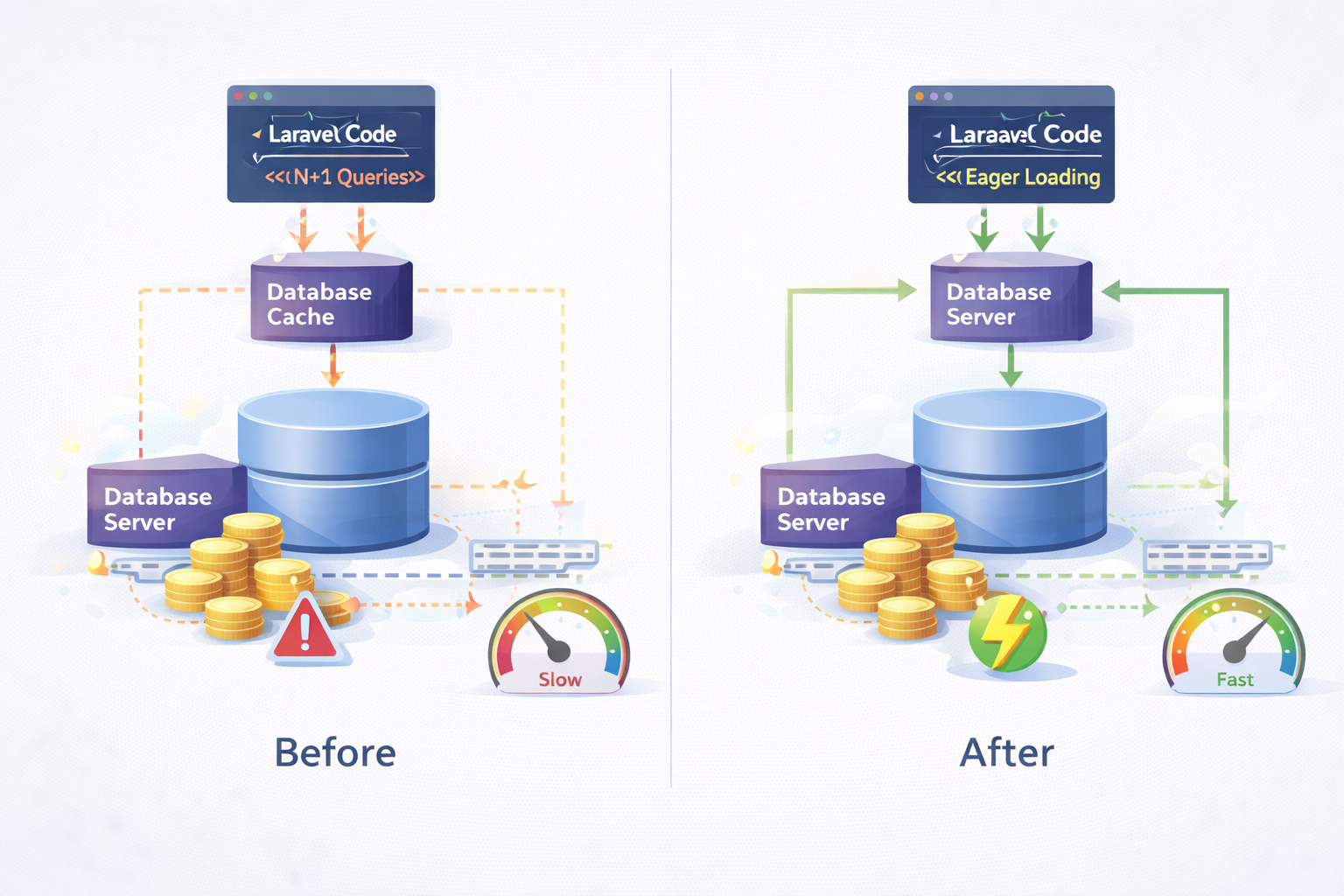
The fix was to load relationships explicitly.
use App\Models\Order;
public function index()
{
$orders = Order::with('customer')
->latest()
->limit(50)
->get();
return $orders->map(function ($order) {
return [
'id' => $order->id,
'total' => $order->total_amount,
'customer_name' => $order->customer->name,
];
});
}Now Laravel executed:
One query for orders
One query for all related customers
Two queries instead of fifty-one.
Why This Single Change Had a 6× Impact
The system wasn’t CPU-bound.
It wasn’t memory-bound.
It was round-trip-bound.
Each additional query meant:
More network latency
More database locks
More connection pool pressure
Reducing query count flattened latency curves instantly. No infrastructure changes. No scaling. Just clarity.
Hardening the Fix Using Laravel 11 Patterns
After fixing performance, I tightened design to prevent regression.
Instead of mapping in the controller, I moved serialization into API Resources.
use App\Http\Resources\OrderResource;
use App\Models\Order;
public function index()
{
return OrderResource::collection(
Order::with('customer')
->latest()
->limit(50)
->get()
);
}use Illuminate\Http\Request;
use Illuminate\Http\Resources\Json\JsonResource;
class OrderResource extends JsonResource
{
public function toArray(Request $request): array
{
return [
'id' => $this->id,
'total' => $this->total_amount,
'customer_name' => $this->customer->name,
];
}
}This makes relationship usage explicit and reviewable.
Preventing N+1 Queries Before They Reach Production
Laravel already gives you a guardrail. Most teams don’t use it.
use Illuminate\Database\Eloquent\Model;
Model::preventLazyLoading(! app()->isProduction());Now, if someone accesses a relationship without eager loading in development, Laravel throws an exception. This single line prevents an entire class of production performance bugs.
The System Design Lesson This Reinforced
N+1 queries are not “junior mistakes.”
They are implicit behavior mistakes.
If your code doesn’t clearly declare what data it needs, the ORM will make decisions for you. Those decisions work at small scale and fail quietly at large scale.
The fix is not memorizing syntax.
The fix is architectural discipline.
Where AI Quietly Helped
AI didn’t fix the bug. It shortened the search.
By analyzing anonymized query logs over time, AI flagged endpoints where query counts suddenly deviated from historical baselines. That narrowed investigation to a handful of APIs instead of the entire system.
This is where AI fits best in engineering: pattern detection and prioritization, not magical solutions.
Final Takeaway
N+1 queries don’t announce themselves.
They wait until scale gives them leverage.
Laravel didn’t betray the system.
Implicit data access did.
Once data intent is explicit and enforced, performance stops being mysterious and starts being predictable.
Suggested Links
If this N+1 issue feels familiar, it strongly mirrors the earlier breakdown where a single missing database index pushed response times from milliseconds to seconds. In both cases, the database was doing expensive work that the code never made obvious.
This article also connects naturally with the cursor pagination deep dive, where performance degradation wasn’t caused by traffic, but by how queries scaled with data depth.
Frequently Asked Questions
Let's build
Have a project worth building?
If this maps to a problem in your business, tell me about it. I will tell you honestly whether software or AI can fix it, and how I would build it.
Continue Reading
Backend Engineering8 min read
Cut Delivery Costs With Route Optimization
Drivers often follow habit, not the shortest path, and every extra mile costs fuel, time, and money. This article explains how route optimization plans smarter delivery routes, with step by step code that cuts distance and keeps deliveries on time.
Jun 29, 202610 views
Backend Engineering10 min read
Prevent Duplicate Payments: A Developer's Guide
Duplicate charges are one of the most damaging bugs in any checkout, and the code usually looks correct. This guide explains why duplicate payments happen and shows you, step by step with code, how to prevent duplicate payments on any stack.
Jun 15, 202620 views

Backend Engineering9 min read
How I Built an AI-Assisted Log Analysis System to Catch Production Issues Before Users Did
Logs were there. Alerts were there. Incidents still slipped through. This guide explains how I combined traditional logging with AI-driven pattern analysis to proactively detect production issues and reduce firefighting.
Mar 12, 202615 views