Fast in Dev, Slow API in Production: Fixing Your API
backend scalability
backend architecture
scalable systems
api performance
production debugging
php
postgresql
slow api
n+1 query
database indexing
caching
connection pooling
8 min read
26 views
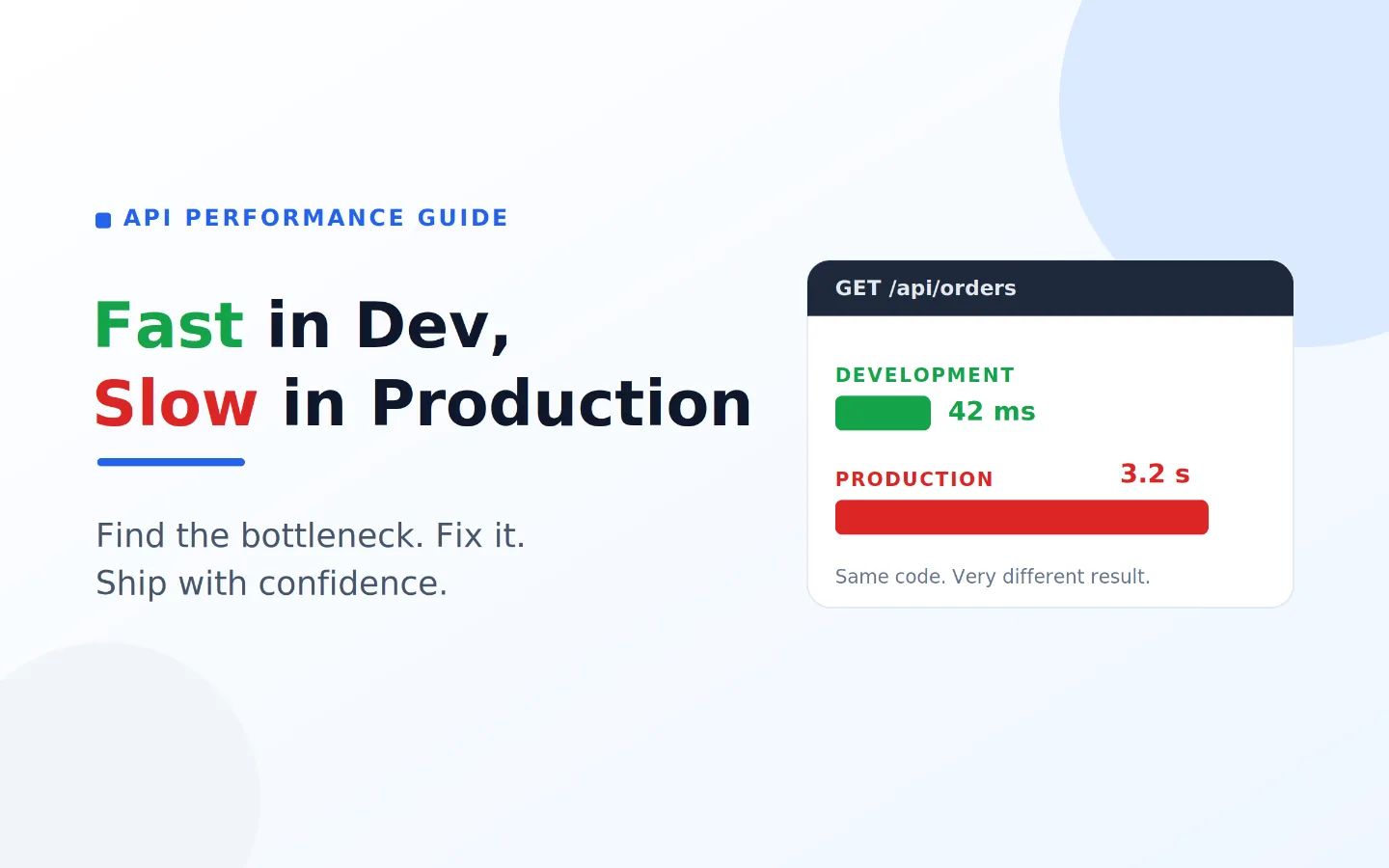
The mystery every developer meets sooner or later
You build an API, it flies on your laptop, every request comes back instantly, and you ship it feeling good. Then real users arrive, and the same endpoints that felt instant now take seconds, time out, or fall over during busy moments. If you have ever stared at a slow API in production and wondered what changed, you are not alone. This is one of the most common surprises in software, and the good news is that the causes are well known and the fixes are not hard. This tutorial walks you through why it happens and how to fix it, step by step, using PHP, PostgreSQL, and a little frontend code.
We will assume you are fairly new to performance work. You do not need to be an expert. You just need to be willing to measure before you guess, which is the single most important habit in this whole topic.
Why the same code behaves so differently
The code did not change between your laptop and production, so why does it feel like a different app. The answer is that the environment changed, and a few specific differences are almost always behind it.
Your dev database is tiny, production is huge
On your machine you might have a hundred rows. In production you have hundreds of thousands or millions. A query that looks instant on a hundred rows can crawl on a million, because the database has to work much harder. This is the number one reason a fast dev API becomes a slow API in production.
The hidden N plus one query
This one is sneaky. Your code fetches a list, then loops over it and runs one more query per item. With five items in dev, that is six quick queries and you never notice. With five hundred items in production, that is five hundred and one queries for a single request, and the page grinds to a halt. This can happen on the backend in PHP, and it can also happen on the frontend when the page calls the API once per row.
Missing indexes
An index is like the index at the back of a book. Without it, PostgreSQL reads every single row to find what you asked for, which is called a full table scan. On small data it is fine. On large data it is slow, and it gets slower every day as the table grows.
No caching
If every request recomputes the same expensive result, you are doing the same hard work over and over. In development, with no traffic, you never feel it. In production, under load, that wasted work piles up fast.
Too many database connections under load
In PHP, each request usually opens its own database connection. On your laptop, with one user, that is one connection. In production, a traffic spike can try to open hundreds at once, PostgreSQL runs out of connections, and requests start queuing or failing. This is why an API can be fine most of the time and then collapse exactly when it is busiest.
How to find the slow part: measure first
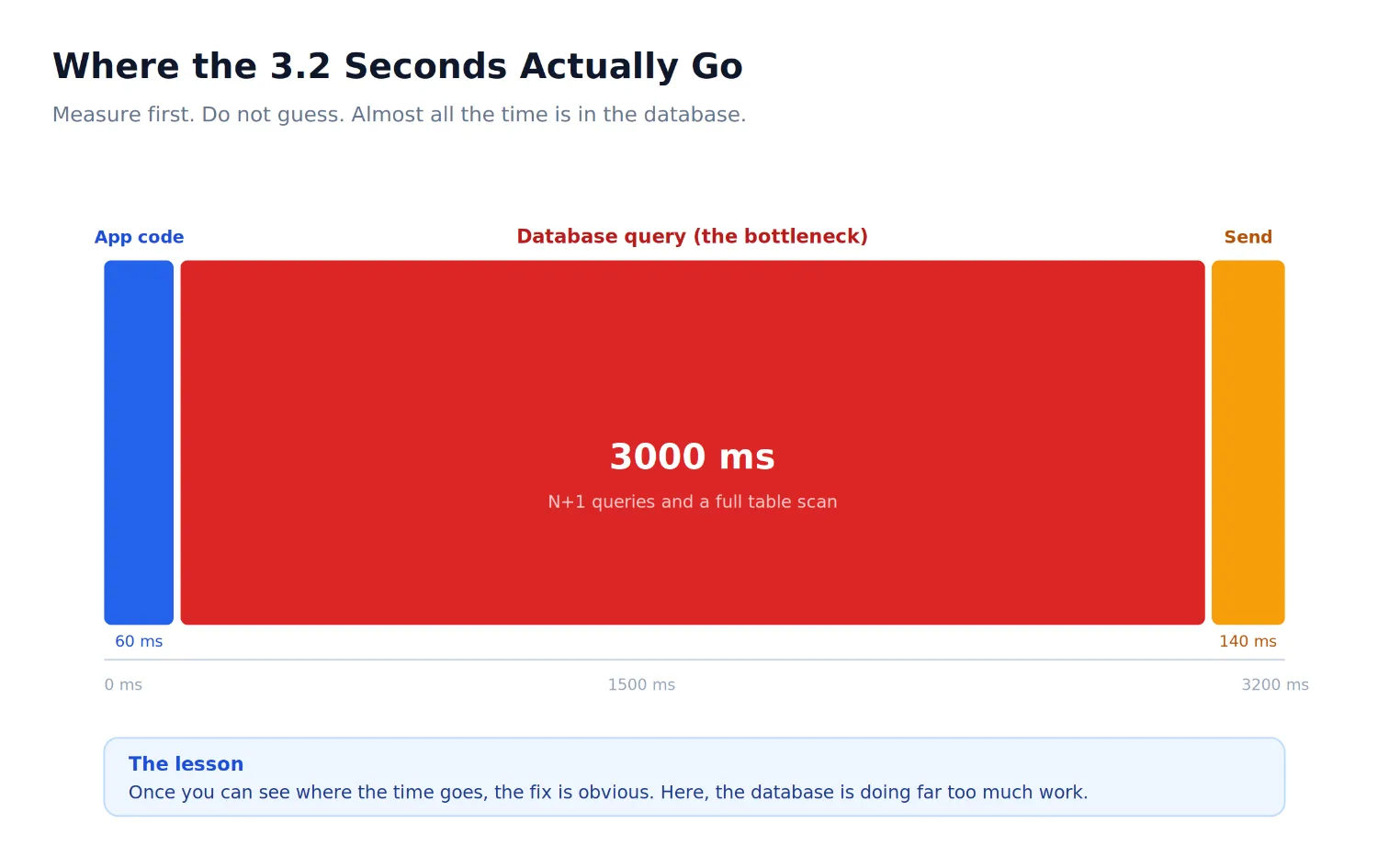
Before you change anything, find out where the time actually goes. Guessing is how people waste days optimising the wrong thing. Start with simple timing around your slow endpoint in PHP.
<?php
// Time how long the endpoint really takes, and log it in production
$start = microtime(true);
$orders = getOrders($_GET);
$ms = round((microtime(true) - $start) * 1000);
error_log("/api/orders took {$ms} ms"); // watch this in your production logs
header('Content-Type: application/json');
echo json_encode($orders);
It is also worth timing the call from the user's side, because the frontend sees the network too.
// Frontend: time how long the API call takes from the user's point of view
const start = performance.now();
const res = await fetch("/api/orders");
const orders = await res.json();
console.log(`orders loaded in ${Math.round(performance.now() - start)} ms`);
Once you know which endpoint is slow, ask PostgreSQL how it runs the query behind it.
-- Ask the database how it runs your query, and how long it takes
EXPLAIN ANALYZE
SELECT * FROM orders WHERE customer_id = 42 ORDER BY created_at DESC;
The two things to look for are a sequential scan, which means a full table scan, and a high actual time. Those point you straight at the fix.
Fixing it step by step
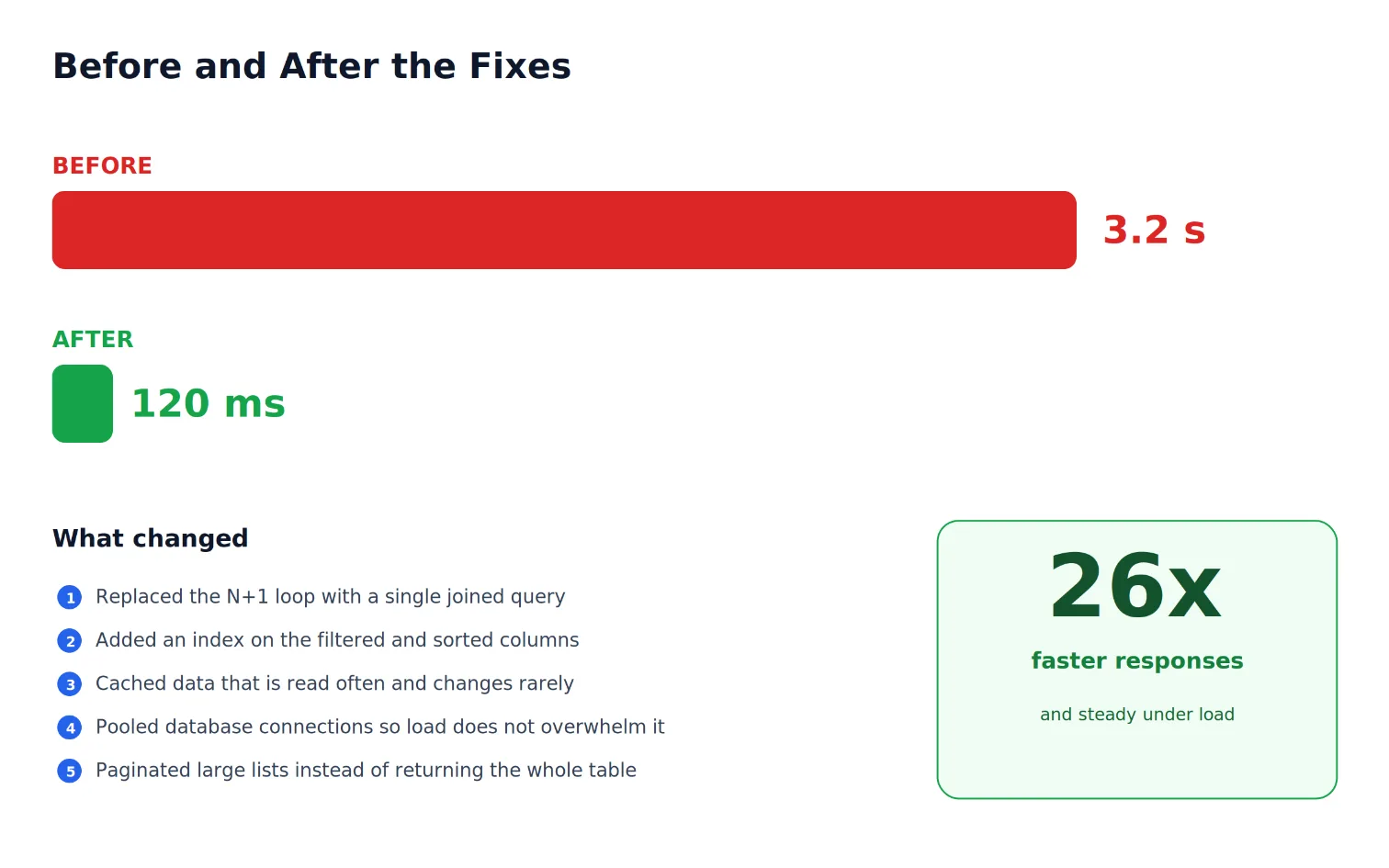
Now the satisfying part. Here are the fixes, in the order I would apply them, starting with the ones that usually help the most.
Fix 1: Kill the N plus one with a single query
First, find any loop that runs a query per item. Here is the trap in PHP.
<?php
// The N+1 problem: one query for the list, then one MORE per row
$orders = $pdo->query("SELECT * FROM orders LIMIT 50")->fetchAll();
foreach ($orders as &$order) {
// This runs 50 extra queries, one per order. Fine on 5 rows, painful on 50.
$stmt = $pdo->prepare("SELECT * FROM customers WHERE id = :id");
$stmt->execute([':id' => $order['customer_id']]);
$order['customer'] = $stmt->fetch();
}
Replace it with one query that fetches everything together using a join.
<?php
// Fix: fetch the orders and their customers in a single joined query
$orders = $pdo->query("
SELECT o.*, c.name AS customer_name, c.email AS customer_email
FROM orders o
JOIN customers c ON c.id = o.customer_id
LIMIT 50
")->fetchAll();
// One query instead of fifty-one. The list loads in a fraction of the time.
The same mistake hides on the frontend. If your page fetches the list and then calls the API again for each row, you have an N plus one over the network, which is even slower.
// Frontend N+1: one request for the list, then one MORE per row
const orders = await (await fetch("/api/orders")).json();
for (const order of orders) {
// One extra network round trip per order. 50 orders means 50 more requests.
order.customer = await (await fetch(`/api/customers/${order.customerId}`)).json();
}
Fix it by asking the backend to return everything in a single response.
// Frontend fix: let the server attach the customer in one request
const orders = await (await fetch("/api/orders?include=customer")).json();
// Each order already has its customer, so no extra round trips.
Fix 2: Add the missing index
For any column you filter, join, or sort by often, add an index so PostgreSQL can jump straight to the rows it needs instead of scanning the whole table.
-- Index the columns this endpoint filters and sorts by
CREATE INDEX idx_orders_customer_created
ON orders (customer_id, created_at DESC);
Run EXPLAIN ANALYZE again, and you should see an index scan replace the sequential scan, with the time dropping sharply.
Fix 3: Cache what does not change often
For data that is read a lot but changes rarely, like a product or a settings record, store the result in a fast cache such as Redis and serve it from there.
<?php
// Cache data that is read often and changes rarely
function getProduct(PDO $pdo, Redis $redis, int $id): array {
$key = "product:$id";
$cached = $redis->get($key);
if ($cached !== false) {
return json_decode($cached, true); // fast path, no database hit
}
$stmt = $pdo->prepare("SELECT * FROM products WHERE id = :id");
$stmt->execute([':id' => $id]);
$product = $stmt->fetch();
$redis->setex($key, 300, json_encode($product)); // cache for 5 minutes
return $product;
}
The first request does the work, and the next ones for a few minutes are nearly instant.
Fix 4: Reuse database connections under load
In PHP, every request opening and closing its own PostgreSQL connection becomes a problem under heavy traffic. Two things help. First, use persistent connections so PHP keeps a connection open and reuses it between requests.
<?php
// Reuse connections instead of opening a fresh one on every request
$pdo = new PDO($dsn, $user, $pass, [
PDO::ATTR_PERSISTENT => true, // keep the connection open between requests
PDO::ATTR_ERRMODE => PDO::ERRMODE_EXCEPTION,
PDO::ATTR_DEFAULT_FETCH_MODE => PDO::FETCH_ASSOC,
]);
Second, and more powerful at scale, put a connection pooler like PgBouncer between your app and PostgreSQL. A small shared pool of connections then serves all your traffic, so a sudden spike does not exhaust the database.
Fix 5: Paginate large lists
Finally, never return a whole table in one response. Send one page at a time, so the work stays small no matter how big the data grows.
<?php
// Return one page at a time using a cursor (keyset pagination)
$limit = min((int)($_GET['limit'] ?? 20), 100);
$cursor = $_GET['cursor'] ?? null; // created_at of the last row the client saw
$stmt = $pdo->prepare("
SELECT * FROM orders
WHERE (:cursor::timestamptz IS NULL OR created_at < :cursor)
ORDER BY created_at DESC
LIMIT :limit
");
$stmt->bindValue(':cursor', $cursor);
$stmt->bindValue(':limit', $limit, PDO::PARAM_INT);
$stmt->execute();
echo json_encode($stmt->fetchAll());
On the frontend, load one page, then fetch the next with the cursor when the user asks for more.
// Frontend: load a page, then continue from where you left off
let cursor = null;
async function loadMore() {
const url = cursor
? `/api/orders?cursor=${encodeURIComponent(cursor)}`
: "/api/orders";
const page = await (await fetch(url)).json();
renderRows(page); // add this page to the list on screen
if (page.length > 0) {
cursor = page[page.length - 1].created_at; // remember where to continue
}
}
A simple checklist before you ship
Before you call an endpoint done, run through a short list. Did you test it against a realistic amount of data, not just a handful of rows. Did you check for any query running inside a loop, on the backend or the frontend. Did you add indexes for the columns you filter and sort by. Did you cache anything expensive that rarely changes. Did you set up persistent connections or a pooler, and paginate your lists. Tick those boxes and most production slowdowns never happen in the first place.
Why this matters to the business
A slow API is not just a developer headache. It is lost money. Slow pages make customers leave, they hurt your search ranking, and they create a flood of complaints during exactly the busy moments when you most want things to run smoothly. When you fix performance, you are not only tidying code. You are protecting sales, keeping customers happy, and making sure your product holds up when success finally arrives. That is why this quiet, unglamorous work is some of the most valuable you can do.
Suggested Links
If you’ve ever faced unexplained database slowdowns, A Single Missing Database Index Took Our App from 120ms to 4.8s. Here’s How I Found Itwalks through the investigation process and the optimization that dramatically improved response times.
Caching doesn’t always make applications faster. Our Cache Made the App Slower. The Redis Cache Mistake I’ll Never Repeat shares a real-world lesson on cache design, invalidation strategies, and performance trade-offs.
Performance bottlenecks often hide in application code. How a Hidden N+1 Query Slowed API by 6x and the Exact Steps I Used to Fix It explains how to identify inefficient database queries and eliminate them before they impact users.
Building payment systems? Prevent Duplicate Payments: A Developer's Guidecovers essential techniques such as idempotency, transaction safety, and payment validation to protect your application from costly errors.
As your data grows, pagination strategies become critical. Why OFFSET Pagination Broke Our API at Scale (And How Cursor Pagination Fixed It) explores why traditional pagination fails under load and how cursor-based pagination improves performance and scalability.
External Links
Frequently Asked Questions
Let's build
Have a project worth building?
If this maps to a problem in your business, tell me about it. I will tell you honestly whether software or AI can fix it, and how I would build it.
Continue Reading

Backend Engineering8 min read
Cut Delivery Costs With Route Optimization
Drivers often follow habit, not the shortest path, and every extra mile costs fuel, time, and money. This article explains how route optimization plans smarter delivery routes, with step by step code that cuts distance and keeps deliveries on time.
Jun 29, 20266 views
Backend Engineering10 min read
Prevent Duplicate Payments: A Developer's Guide
Duplicate charges are one of the most damaging bugs in any checkout, and the code usually looks correct. This guide explains why duplicate payments happen and shows you, step by step with code, how to prevent duplicate payments on any stack.
Jun 15, 202613 views

Backend Engineering17 min read
How a Hidden N+1 Query Slowed API by 6x and the Exact Steps I Used to Fix It
The API wasn’t crashing. Nothing looked broken. But production response times quietly became six times slower. This is a real-world breakdown of how a hidden N+1 query slipped through reviews, how I proved it in Laravel, and the exact steps that fixed it permanently.
Mar 12, 2026137 views