How I Eliminated Memory Leaks in a High-Traffic Node.js API That Everyone Thought Was “Stateless”
14 min read
12 views

The Node.js Memory Leak Nobody Expects
Node.js has a reputation for being lightweight, fast, and perfect for scalable APIs. That reputation is mostly deserved, but it creates a dangerous assumption: that if your code is stateless, memory leaks are unlikely.
That assumption is wrong.
I ran into this problem while maintaining a Node.js API handling real-time events and analytics ingestion. On paper, the service was simple. No heavy computation. No in-memory caching layer. No global state. Yet memory usage kept climbing until the process was killed by the container orchestrator.
What made this problem difficult was not the leak itself. It was the illusion that there couldn’t be one.
Why Memory Leaks in Node.js Are Harder Than They Look
Node.js leaks rarely come from obvious mistakes like infinite loops or massive arrays. They come from small, seemingly harmless patterns that accumulate under load.
In development, the service ran perfectly. Requests were short-lived. Memory usage stabilized. In production, with sustained traffic, memory usage increased slowly but consistently.
This is the worst kind of bug. Nothing fails immediately. Alerts come late. Logs look normal. Engineers assume autoscaling will handle it. It doesn’t.
The Real Culprits Behind Production Memory Leaks
After investigating multiple real-world systems, the same root causes show up again and again.
Closures Retaining Request Context
JavaScript closures are powerful. They are also dangerous when combined with async operations.
In our case, request-specific objects were unintentionally retained by callbacks attached to long-lived event emitters.
Wrong Code
app.get('/process', (req, res) => {
eventEmitter.on('done', () => {
console.log(req.headers['user-agent']);
});
res.send('Processing started');
});Every request added a new listener. Each listener retained access to req. Under traffic, memory usage ballooned.
Production-Grade Fix
app.get('/process', (req, res) => {
const userAgent = req.headers['user-agent'];
const handler = () => {
console.log(userAgent);
};
eventEmitter.once('done', handler);
res.send('Processing started');
});What changed
The request object is no longer retained. Only the required primitive data is captured, and the listener is removed automatically.
Unbounded In-Memory Caches
In-memory caching feels like free performance. It is not free if you don’t control its size.
I have seen teams cache database responses in plain JavaScript objects without eviction policies. Over time, the cache simply becomes a memory leak disguised as optimization.
Wrong Code
const cache = {};
function getUser(id) {
if (!cache[id]) {
cache[id] = fetchUserFromDB(id);
}
return cache[id];
}This cache grows forever.
Production-Grade Fix
import LRU from 'lru-cache';
const cache = new LRU({
max: 5000,
ttl: 1000 * 60 * 5
});
function getUser(id) {
if (!cache.has(id)) {
cache.set(id, fetchUserFromDB(id));
}
return cache.get(id);
}Business impact
Predictable memory usage means predictable infrastructure costs. Unbounded caches silently destroy both.
Promises That Never Resolve
One of the hardest leaks to detect involved promises that were created but never resolved due to edge-case failures in external APIs.
Each hanging promise held references to large objects. Under load, thousands accumulated.
The fix was not just adding timeouts. It was defensive programming.
Always assume external systems can fail silently.
Excessive Use of Global State
Even experienced developers underestimate how long Node.js processes live in production.
Anything stored globally lives for the lifetime of the process. This includes:
Configuration merged at runtime
Metrics buffers
Debug data
Feature-flag snapshots
If it grows, it leaks.
Stateless APIs must be stateless in memory, not just in logic.
Why This Hurt the Business, Not Just the Code
Every memory spike triggered container restarts. Active requests were dropped. Clients retried. Load increased further.
The business impact showed up as:
Inconsistent response times
Random failures during peak hours
Increased cloud spend
Support tickets blaming “unstable systems”
No amount of scaling fixed it because the leak scaled with traffic.
How I Diagnosed the Leak for Real
Guessing doesn’t work here. You need tools.
I used:
Node.js heap snapshots
Process memory tracking over time
Garbage collection logs
Flame graphs under sustained load
The turning point was comparing heap snapshots taken 30 minutes apart. Objects that should have been collected were still there.
Memory leaks stop being mysterious when you look at what survives garbage collection.
The Fix That Actually Worked Long-Term
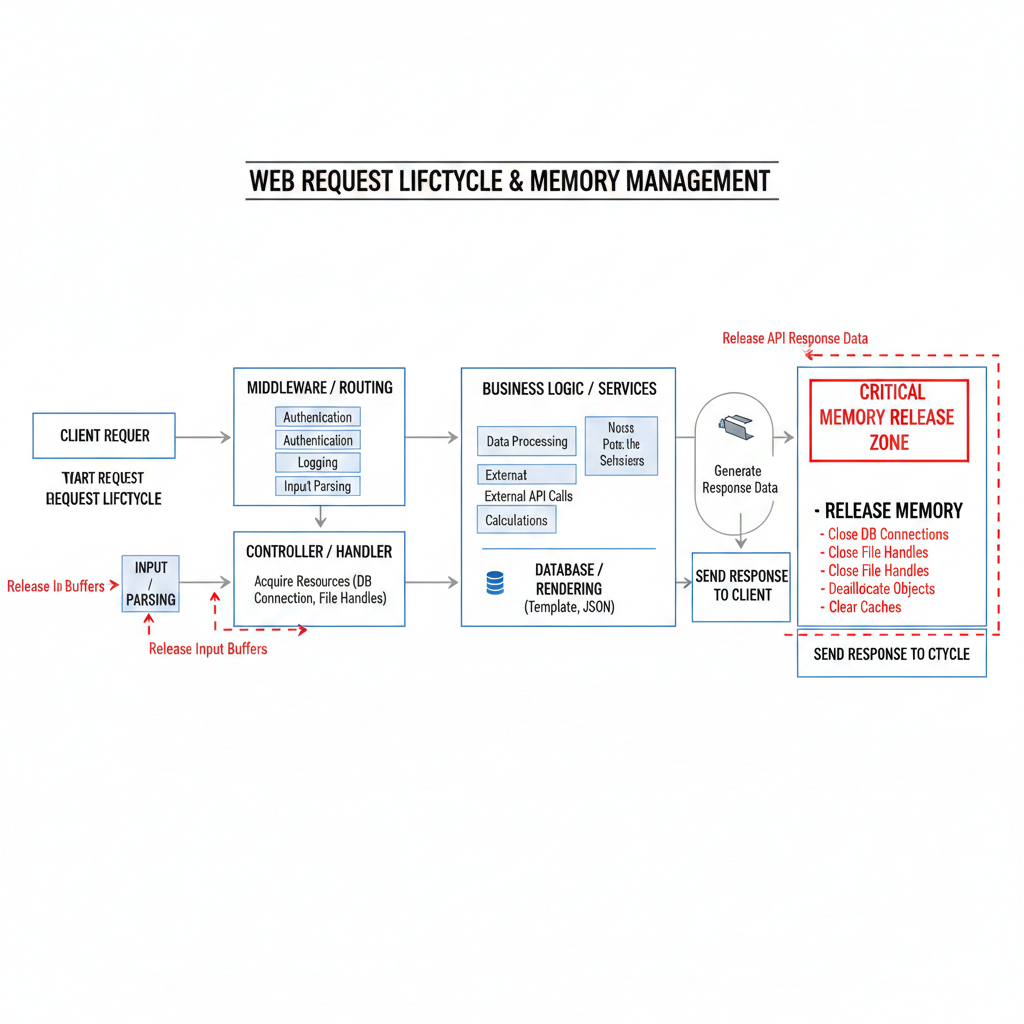
The final solution was not a single change. It was a discipline shift:
No request objects stored outside request scope
All caches bounded and observable
Event listeners cleaned up explicitly
Timeouts and circuit breakers for every external call
After deploying fixes, memory usage flattened. Restarts stopped. Latency stabilized. Engineering stopped firefighting.
This is the moment where teams regain confidence in their systems.
The Lesson Most Teams Learn Too Late
Node.js is not unsafe. Blind trust is.
If your system handles real traffic, memory behavior is part of your architecture. Not an afterthought. Not a “later” problem.
Once teams internalize this, they stop chasing phantom bugs and start building systems that age gracefully under load.
One more example
Wrong Pattern
setInterval(() => {
heavyObjectStore.push(fetchData());
}, 1000);Production-Grade Pattern
setInterval(() => {
const data = fetchData();
processData(data);
}, 1000);Do the work, then release the reference. Holding data “just in case” is how memory leaks start.
Suggested Links
If you’re dealing with subtle performance issues like memory leaks, it’s rarely just one isolated problem; systems fail in patterns. You might also find it useful to explore How I Built an AI-Assisted Log Analysis System to Catch Production Issues Before Users Did, or learn from a painful lesson where our cache actually made the app slower due to a Redis mistake I’ll never repeat. And if your frontend is part of the stack, understanding why most Next.js apps become slow over time can help you avoid compounding backend inefficiencies with frontend bottlenecks.
Frequently Asked Questions
Let's build
Have a project worth building?
If this maps to a problem in your business, tell me about it. I will tell you honestly whether software or AI can fix it, and how I would build it.
Continue Reading

Backend Engineering8 min read
Cut Delivery Costs With Route Optimization
Drivers often follow habit, not the shortest path, and every extra mile costs fuel, time, and money. This article explains how route optimization plans smarter delivery routes, with step by step code that cuts distance and keeps deliveries on time.
Jun 29, 202610 views

Backend Engineering10 min read
Prevent Duplicate Payments: A Developer's Guide
Duplicate charges are one of the most damaging bugs in any checkout, and the code usually looks correct. This guide explains why duplicate payments happen and shows you, step by step with code, how to prevent duplicate payments on any stack.
Jun 15, 202620 views

Backend Engineering17 min read
How a Hidden N+1 Query Slowed API by 6x and the Exact Steps I Used to Fix It
The API wasn’t crashing. Nothing looked broken. But production response times quietly became six times slower. This is a real-world breakdown of how a hidden N+1 query slipped through reviews, how I proved it in Laravel, and the exact steps that fixed it permanently.
Mar 12, 2026140 views