How I Converted a Client-Side Rendered Page to Server-Side Rendering Without Breaking SEO or Performance
16 min read
17 views

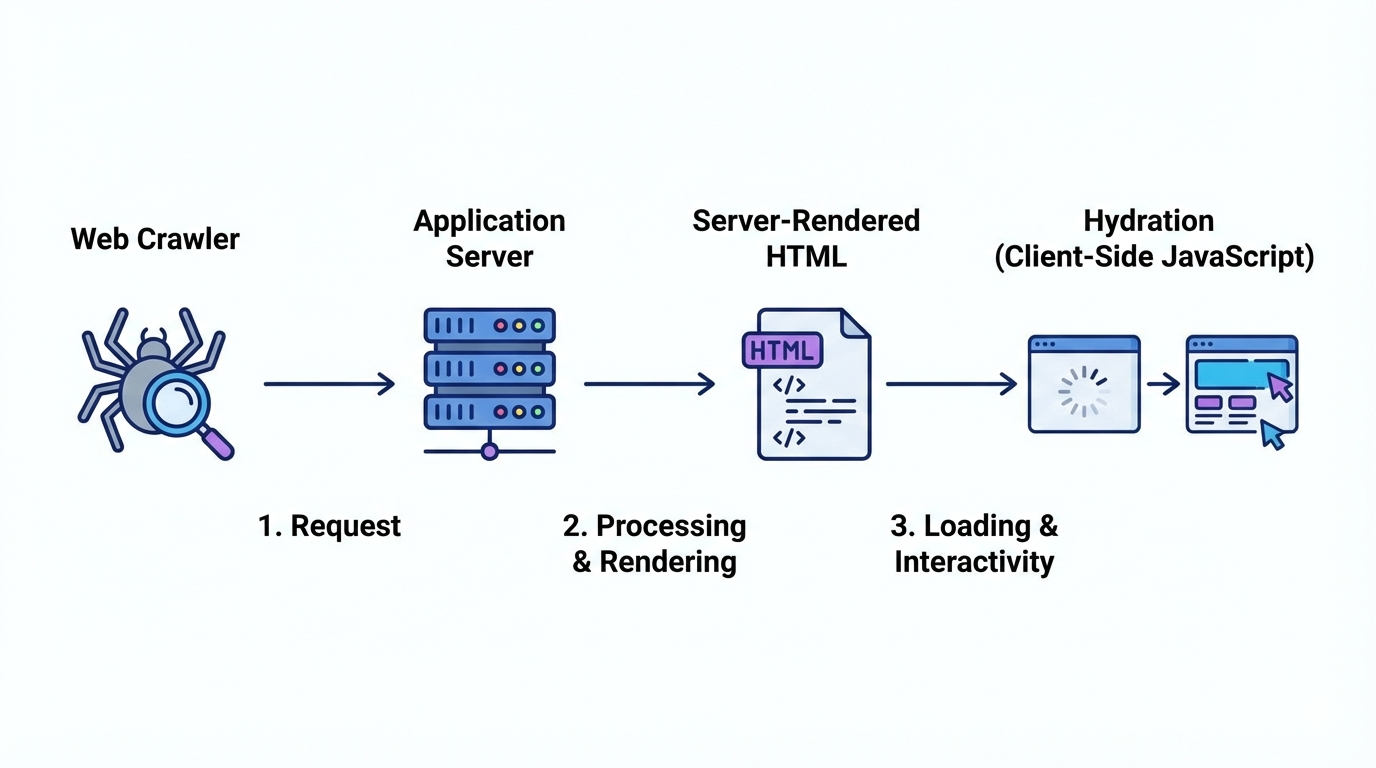
I encountered this while dealing with client-side rendering SEO issues on a production blog and landing page. Despite pages being indexed in Google Search Console, impressions stayed near zero and crawl behavior was inconsistent. The root problem was clear: critical content wasn’t present in the initial HTML, hurting search indexing and overall performance. This is where CSR to SSR migration becomes essential, server-side rendering ensures complete HTML delivery, improving SEO, visibility, and page rendering performance without relying on JavaScript execution
Client-Side Rendering (CSR) became popular because it makes development feel fast. You ship quickly. Pages feel interactive. React state flows nicely. Everything looks fine until you check search performance.
I faced this exact issue on a production blog and landing page setup. Google Search Console showed pages indexed, but impressions were near zero. Crawl stats were inconsistent. Rich results never appeared. The reason was simple.
The content did not exist at initial HTML response time.
Search engines have improved JavaScript rendering, but they still prioritize fast, complete HTML. Relying on client-side hydration for critical content is a gamble. Sometimes it works. Often it does not. SEO needs determinism, not hope.
What CSR Actually Ships to Search Engines
In a typical CSR page, the server sends a minimal HTML shell. The real content is fetched in the browser after JavaScript loads.
Example CSR flow:
Server sends empty or placeholder HTML
Browser downloads JS bundle
API call fetches content
React renders content
For users, this feels fine. For crawlers, this introduces:
Delayed content discovery
Incomplete indexing
Missed metadata
Weak semantic signals
If SEO matters, this architecture is fragile.
When You Should Convert CSR to SSR
You do not need SSR everywhere. This is a common misunderstanding.
You should convert to SSR when:
Page content is important for SEO
Content is indexable and stable
Metadata depends on fetched data
Page is an entry point from search engines
Examples:
Blog posts
Category listings
Product pages
Marketing landing pages
Pages that usually stay CSR:
Dashboards
Authenticated user areas
Internal tools
The goal is selective SSR, not blanket SSR.
Starting Point – A Typical Client-Side Rendered Page
Let’s take a simple React page fetching blog posts on the client.
CSR Example (Before)
"use client";
import { useEffect, useState } from "react";
export default function BlogPage() {
const [posts, setPosts] = useState([]);
useEffect(() => {
fetch("/api/posts")
.then(res => res.json())
.then(data => setPosts(data));
}, []);
return (
<main>
<h1>Blog</h1>
{posts.map(post => (
<article key={post.id}>
<h2>{post.title}</h2>
<p>{post.excerpt}</p>
</article>
))}
</main>
);
}What goes wrong here
HTML response contains no blog content
Title and headings are not crawlable initially
Search engines must execute JS to see content
Metadata cannot depend on post data
This is the exact setup that causes weak indexing.
Step 1 – Decide Your SSR Strategy
There are three real-world SSR approaches.
Full SSR
Content rendered on every request
Best for frequently changing dataStatic Generation with Revalidation
Content pre-rendered and refreshed periodically
Best for blogs and documentationHybrid SSR
Server-render critical content, hydrate interactivity later
Best for SEO + UX balance
For blogs and SEO pages, static generation with revalidation is usually the smartest choice.
Step 2 – Move Data Fetching to the Server
Using Next.js App Router, the biggest shift is mental. Data fetching moves out of useEffect and into the server.
SSR Version (After)
export default async function BlogPage() {
const res = await fetch("https://example.com/api/posts", {
next: { revalidate: 3600 }
});
const posts = await res.json();
return (
<main>
<h1>Blog</h1>
{posts.map((post: any) => (
<article key={post.id}>
<h2>{post.title}</h2>
<p>{post.excerpt}</p>
</article>
))}
</main>
);
}What changed
Content is rendered on the server
HTML response includes full blog content
Search engines see real text immediately
Performance improves for first contentful paint
No client-side hooks. No loading states for SEO-critical content.
Step 3 – Convert Metadata to Server-Generated SEO
CSR pages usually hardcode metadata or skip it entirely. This kills SEO.
With SSR, metadata should be generated using fetched data.
Dynamic Metadata Example
export async function generateMetadata() {
const res = await fetch("https://example.com/api/blog-meta");
const data = await res.json();
return {
title: data.title,
description: data.description,
openGraph: {
title: data.title,
description: data.description
}
};
}Why this matters
Title and description match page content
Open Graph previews work correctly
Search engines get consistent signals
No mismatch between content and metadata
This alone can improve click-through rates.
Step 4 – Handle Dynamic Routes Correctly
Dynamic pages are where CSR breaks hardest.
CSR approach:
Route loads
JS fetches content
SEO bots may miss content entirely
SSR approach:
Route is resolved on the server
Data is fetched before HTML is sent
Dynamic SSR Example
export default async function BlogPost({ params }: any) {
const res = await fetch(
`https://example.com/api/posts/${params.slug}`,
{ next: { revalidate: 86400 } }
);
const post = await res.json();
return (
<article>
<h1>{post.title}</h1>
<div dangerouslySetInnerHTML={{ __html: post.content }} />
</article>
);
}This ensures every blog post URL is fully indexable.
Step 5 – Keep Client Components Only Where Needed
SSR does not mean abandoning interactivity.
Split responsibilities:
Server Components for content and SEO
Client Components for interactions
Example
// Server Component
import LikeButton from "./LikeButton";
export default function Post({ post }: any) {
return (
<>
<h1>{post.title}</h1>
<LikeButton postId={post.id} />
</>
);
}"use client";
export default function LikeButton({ postId }: any) {
return <button>Like</button>;
}This keeps HTML clean while preserving UX.
Step 6 – Validate SEO Improvements
After conversion, verify impact.
What I check every time:
View page source: content should be visible
Lighthouse SEO score
Search Console indexing status
Crawl stats consistency
Rich result eligibility
In one case, impressions increased within two weeks simply because content became reliably crawlable.
CSR Pattern (Wrong for SEO)
useEffect(() => {
fetchData();
}, []);SSR Pattern (Production-Ready)
const data = await fetchData();Plain explanation
If content matters for discovery, render it before the browser ever runs JavaScript.
Common Mistakes During CSR to SSR Migration
Mistakes I see repeatedly:
Keeping use client unnecessarily
Fetching data twice (server and client)
Blocking SSR with auth logic
Using environment-specific URLs incorrectly
Overusing SSR for dashboards
SSR should be deliberate, not automatic.
Business Impact of Doing This Right
SSR is not just about rankings.
Real outcomes I have seen:
Faster perceived load time
Better crawl coverage
Higher CTR from search
Improved content authority
Lower bounce rates
When content loads instantly and is semantically clear, users trust it more. Search engines do too.
Final Thought
Client-side rendering is not wrong. Using it blindly for SEO-critical pages is.
Converting CSR to SSR is not about rewriting everything. It is about understanding which pages deserve to exist fully at first byte.
Once teams adopt this mindset, SEO stops being mysterious and starts becoming predictable.
Suggested Links
If you’re trying to build systems that actually scale, it helps to recognize recurring failure patterns across the stack. You might want to dig into Why Most Next.js Apps Become Slow Over Time, especially if your frontend is quietly accumulating performance debt. On the backend side, I also break down How I Built an AI-Assisted Log Analysis System to Catch Production Issues Before Users Did, which can save you from reactive firefighting. For architecture decisions, AI Agents vs AI Workflows Architecture Step by Step Guide clarifies when each approach makes sense instead of overengineering too early. And if your API feels inexplicably slow, the deep dive into How a Hidden N+1 Query Slowed API by 6x and the Exact Steps I Used to Fix It walks through the exact steps to identify and fix one of the most common but overlooked bottlenecks.
Frequently Asked Questions
Let's build
Have a project worth building?
If this maps to a problem in your business, tell me about it. I will tell you honestly whether software or AI can fix it, and how I would build it.